Configure buying rules and budgets
Preview merchant-authored offers with condition, quantity and budget controls.
On this page
Before you begin
Open Buy / Trade → Buying rules with permitted management access.
Staff with buying access; approvals and payouts depend on role. Company feature access and current setup requirements apply.
Step by step
- 1
Choose the rule scope
Review the exact products or supported categories and conditions the rule applies to. Avoid ambiguous source matches.
- 2
Set the offer basis
Use the supported fixed or percentage calculation, minimum resale value and owned-quantity controls. Check cash and credit terms separately.
- 3
Review quantity and budget limits
Use the available ceilings and explain how current stock and commitments affect the offer.
- 4
Preview before saving
Inspect example outcomes and excluded lines. Save only the intended rule version, then use a separate reviewed customer quote for an actual purchase.
On the screen
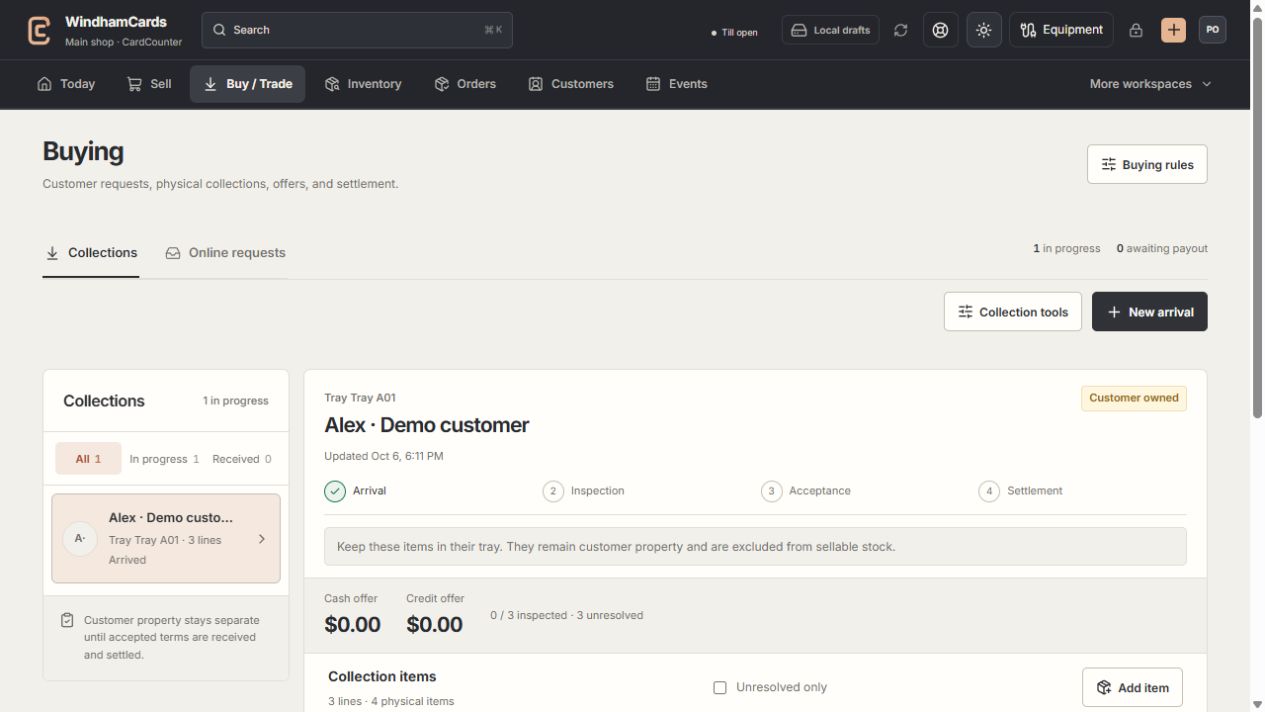
- 1Collection queue
Keep the customer and tray reference attached to the property.
- 2Progress and ownership
Arrival, inspection, acceptance and settlement are separate stages.
- 3Offer summary
Inspect the exact lines and their offers before creating a cash or credit quote.
Keep in mind
The tool uses merchant-authored values. A preview is neither a customer quote nor purchase approval.
An included feature does not activate a live payout method. Settlement follows its own readiness checks.
If something goes wrong
An offer is unexpectedly zero or blocked
Read the rule explanation and check condition, minimum value, quantity ceilings and remaining budget.