Review source pricing suggestions
Use fresh exact market observations with floors, rounding and change guardrails before owner approval.
On this page
Before you begin
Open Inventory → Pricing and inspect the source-linked product and its pricing rule.
Owners with pricing and market access. Company feature access and current setup requirements apply.
Step by step
- 1
Verify the source match
Confirm the source variant and currency match your exact SKU. Read observation age, condition and finish rather than using a card-name average.
- 2
Configure the rule
Choose a multiplier, minimum and optional maximum price, rounding increment, large-change threshold and maximum observation age.
- 3
Prepare a review
Source checks can refresh observations and prepare suggestions. Inspect the proposed amounts and reasons for blocked, missing or conflicting observations.
- 4
Approve deliberately
An authorized owner reviews and applies eligible price changes. Large movements require attention; scheduled checks are not a promise of automatic repricing.
On the screen
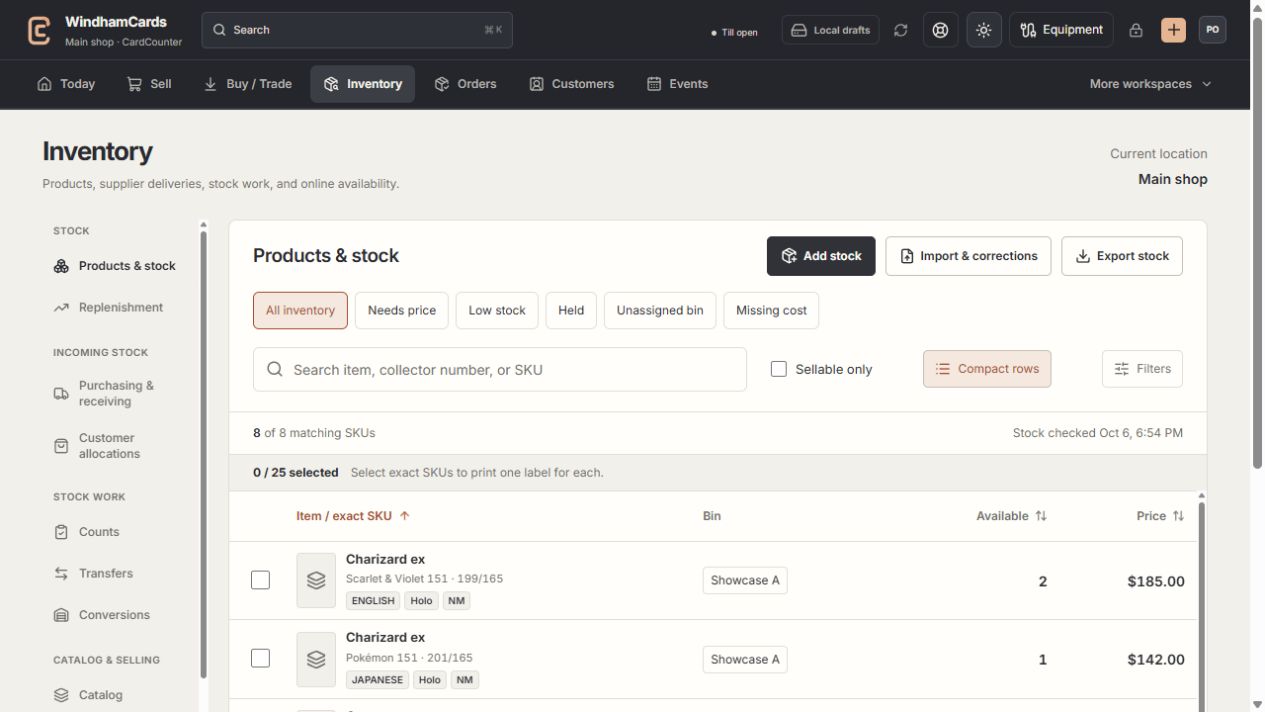
- 1Inventory sections
Move between stock work, pricing, channels, labels and scanning.
- 2Saved views and search
Find missing prices, low stock, holds or an exact shop SKU.
- 3Available stock
Read quantities and physical bins for the exact variant.
Keep in mind
Stale, incompatible, conflicting or missing observations cannot justify a shop price change. Temporary prices remain protected.
Market observations are reference evidence. Your shop remains responsible for the selling price and source permissions.
If something goes wrong
No suggestion is prepared
Read the source, freshness and access explanation. Check that the exact variant is mapped and the company has ready market access.