Count and reconcile physical stock
Record counted copies, review differences and post approved stock adjustments with reasons.
On this page
Before you begin
Open Inventory → Counts with the physical bin ready to count.
Owners and managers; stock visibility depends on role. Company feature access and current setup requirements apply.
Step by step
- 1
Define the count
Choose the location, bin and exact products supported by the count flow. Avoid changing stock for the same items while the count is being reviewed.
- 2
Count physical copies
Check each printing and condition, then enter the actual quantity. Do not copy the expected number when the physical count differs.
- 3
Review differences
Inspect expected, counted and variance quantities and any new movement or active reservation that affects the review.
- 4
Record and approve the adjustment
Provide a clear reason and use the permitted posting action. Refresh a stale review rather than overwriting newer stock activity.
- 5
Verify history
Open the count result and stock movements. The reasoned adjustment should explain why the available position changed.
On the screen
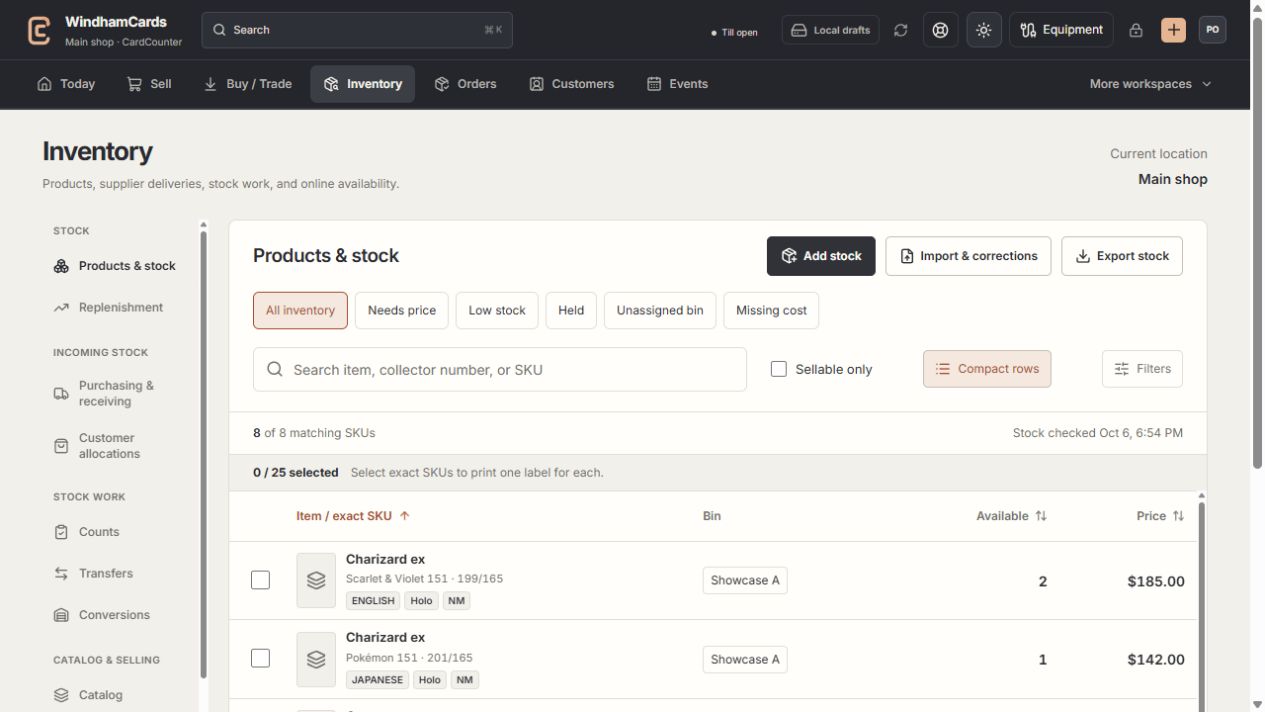
- 1Inventory sections
Move between stock work, pricing, channels, labels and scanning.
- 2Saved views and search
Find missing prices, low stock, holds or an exact shop SKU.
- 3Available stock
Read quantities and physical bins for the exact variant.
Keep in mind
Counting stock is distinct from receiving newly owned stock. Use the appropriate source workflow.
Reserved stock still exists physically; check the count’s stated quantity basis before adjusting it.
If something goes wrong
The count is stale
Read the changed-stock explanation, refresh the expected position and recount or re-review affected items.