Connect Shopify and map inventory
Connect the merchant storefront and map exact products and stock locations.
On this page
Before you begin
Open Connections → Shopify.
Owners and managers; account authorizations may require the owner. Company feature access and current setup requirements apply.
Step by step
- 1
Review authorization readiness
Use the shop’s permitted authorization flow and inspect environment and required access. Do not substitute another merchant’s account.
- 2
Map exact products
Link the correct channel product and variant to the shop SKU. Verify language, finish and condition where relevant.
- 3
Map the stock location
Check the intended Shopify inventory location and the CardCounter physical location before enabling quantity sync.
- 4
Review connection health
Use the current health and sync controls, then inspect a confirmed result. Resolve import or mapping exceptions before publishing or fulfilling affected products.
On the screen
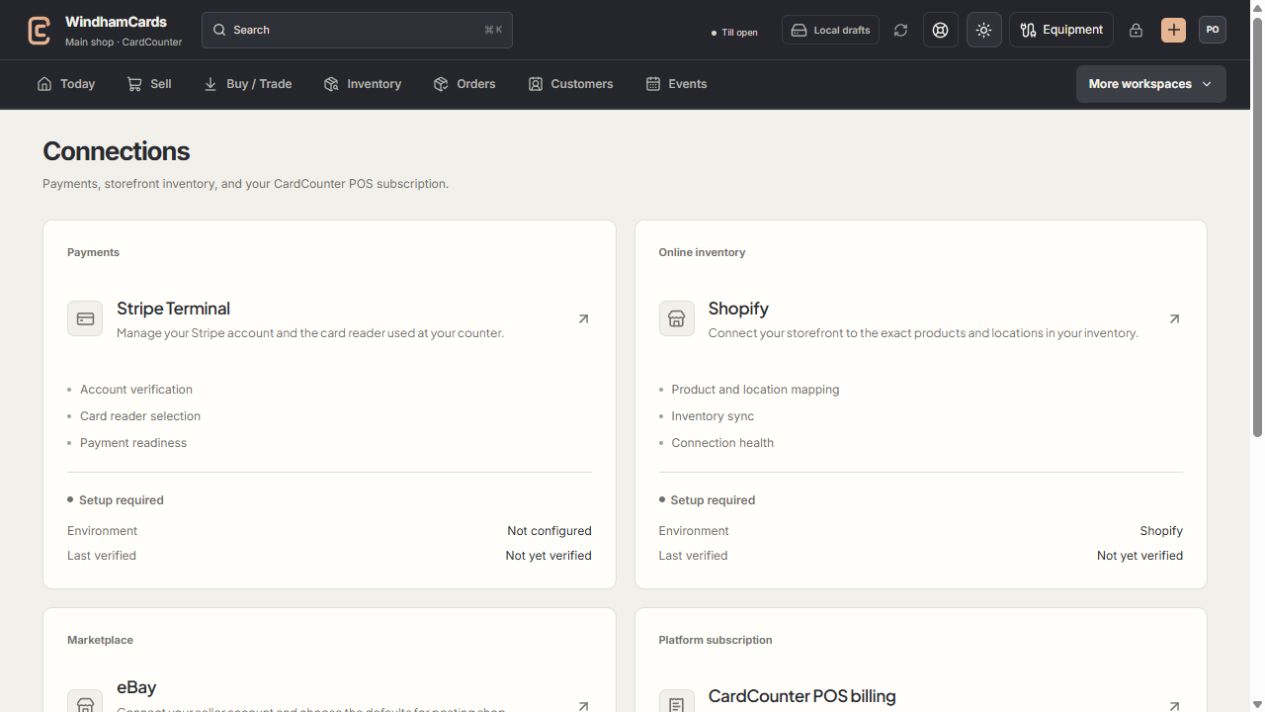
- 1Provider setup
Open the service you intend to configure or review.
- 2Status and verification
Environment and last verification are part of readiness.
- 3Separate billing
Platform billing differs from counter payments and seller postage.
Keep in mind
Authorization, mapping, inventory delivery and paid order readiness are different states.
Customer association has its own verification flow; a matching name is not enough to link private customer records.
If something goes wrong
Orders or quantities do not match
Review variant and location mappings, current provider scopes, last confirmed sync and order exceptions.