Record a collection arrival
Track customer-owned property in a tray before inspection, acceptance and settlement.
On this page
Before you begin
Open Buy / Trade → Collections.
Staff with buying access; approvals and payouts depend on role. Company feature access and current setup requirements apply.
Step by step
- 1
Record the arrival
Choose New arrival, select or create the verified customer and assign a tray reference. List the physical items and their declared quantities.
- 2
Keep custody separate from ownership
Use the collection queue and tray label to find the property. Arrived items remain customer owned and are excluded from sellable inventory.
- 3
Inspect each line
Open the declared item, confirm the exact SKU and condition, and record reviewed cash and credit offers. Use Unresolved only to find lines still needing identification.
- 4
Follow collection progress
Move through inspection, acceptance and settlement using the recorded flow. Review the current offer rather than treating the first customer description as verified stock.
On the screen
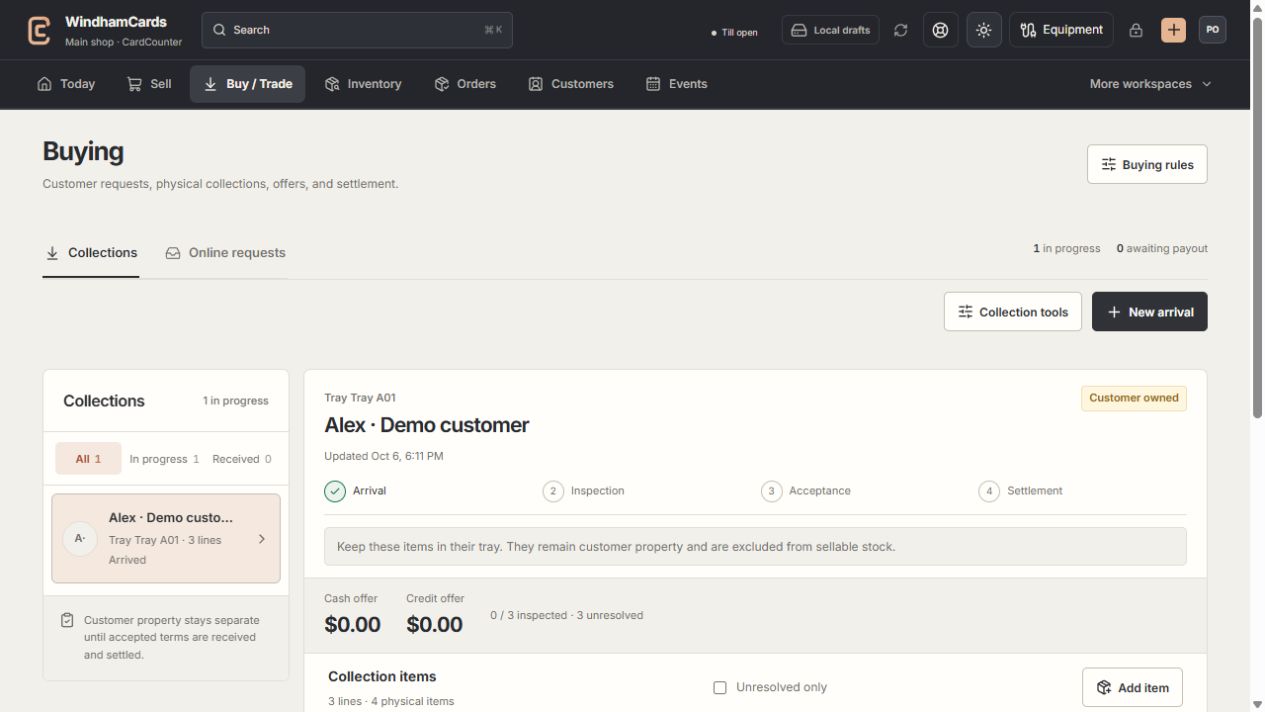
- 1Collection queue
Keep the customer and tray reference attached to the property.
- 2Progress and ownership
Arrival, inspection, acceptance and settlement are separate stages.
- 3Offer summary
Inspect the exact lines and their offers before creating a cash or credit quote.
Keep in mind
Receiving customer property into a tray does not purchase it. Ownership changes only through the permitted accepted acquisition flow.
Keep unidentified items unresolved until their printing and condition can be established.
If something goes wrong
There is no quote to accept
Inspect the required lines and resolve missing offers. Read the collection’s current progress and any linked online request.