Split a sale across tenders
Review a combination of supported tenders while keeping one sale and its payment history.
On this page
Before you begin
Open a current sale quote and choose the split-payment flow where available.
Staff with counter access. Company feature access and current setup requirements apply.
Step by step
- 1
Plan the amounts
Agree how much will be paid by each ready tender. Check the customer’s available credit and the remaining amount due.
- 2
Prepare each tender
Enter the intended amount in the split review. Each cash, credit or card portion follows its own confirmation rules.
- 3
Follow the remaining balance
Review the confirmed portions and current amount still payable. Do not resend a successful tender after another portion fails.
- 4
Confirm the complete sale
Wait until the required total is confirmed. Read the final receipt’s tender breakdown and reconcile any pending provider portion.
On the screen
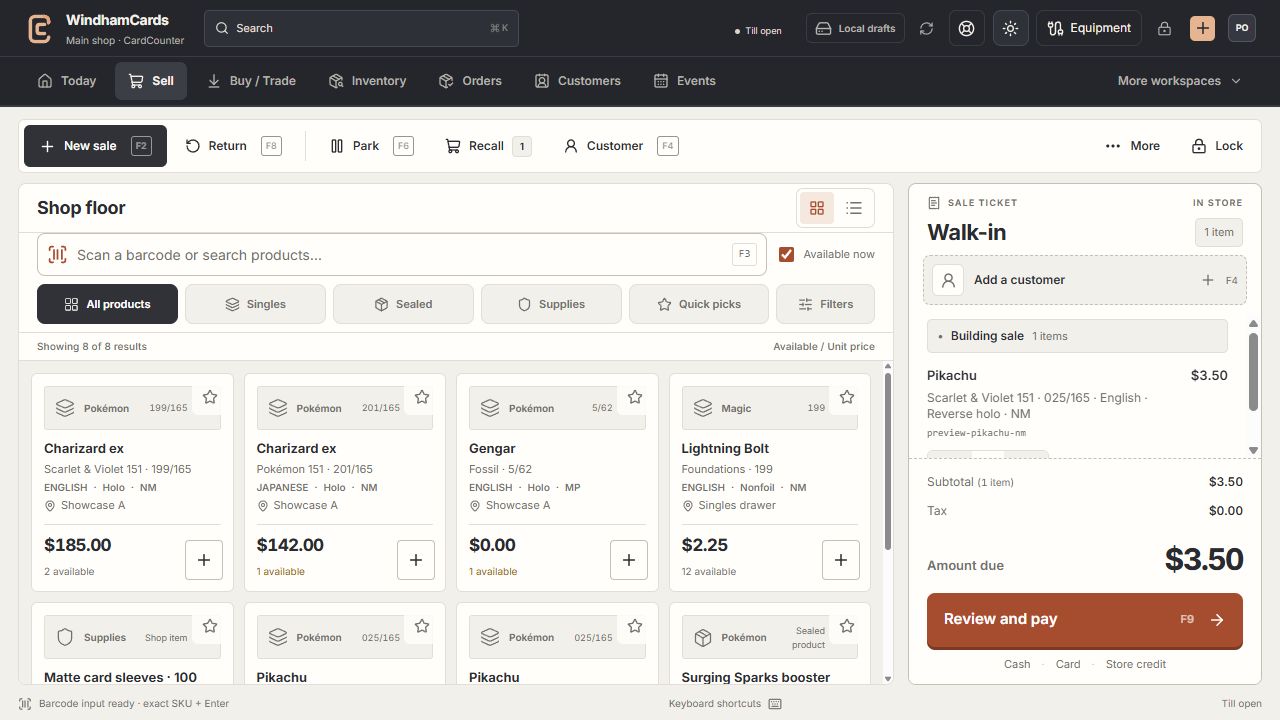
- 1Register actions
Start, park or recall a sale and open the customer panel.
- 2Exact product search
Search or scan, then confirm the printing, finish and condition.
- 3Sale ticket
Review the customer, quantities and current amount before payment.
Keep in mind
Splitting a payment does not bypass card-reader readiness or store-credit checks.
A partial or unknown result needs review of the existing sale. Starting a new cart can create a second obligation rather than fixing the first.
If something goes wrong
One part is confirmed and another is unclear
Open the saved sale and its tender history. Resolve the outstanding portion using the displayed recovery action.