Convert product forms
Record physical breakdowns such as a sealed product becoming other exact stock items.
On this page
Before you begin
Open Inventory → Conversions after checking the source product and intended outputs.
Owners and managers; stock visibility depends on role. Company feature access and current setup requirements apply.
Step by step
- 1
Select the source stock
Choose the source SKU, bin and quantity physically being converted. Check available units and source cost coverage.
- 2
Define exact outputs
Choose the resulting SKUs, quantities and destination bins. Review the relationship between consumed source units and created output units.
- 3
Document the handling
Enter the supported physical-handling reason and inspect the cost allocation preview. Unknown source cost must remain visible as unknown.
- 4
Confirm the reviewed conversion
Post only after the physical breakdown is complete and the outputs have been counted. Verify both source consumption and output receipt history.
On the screen
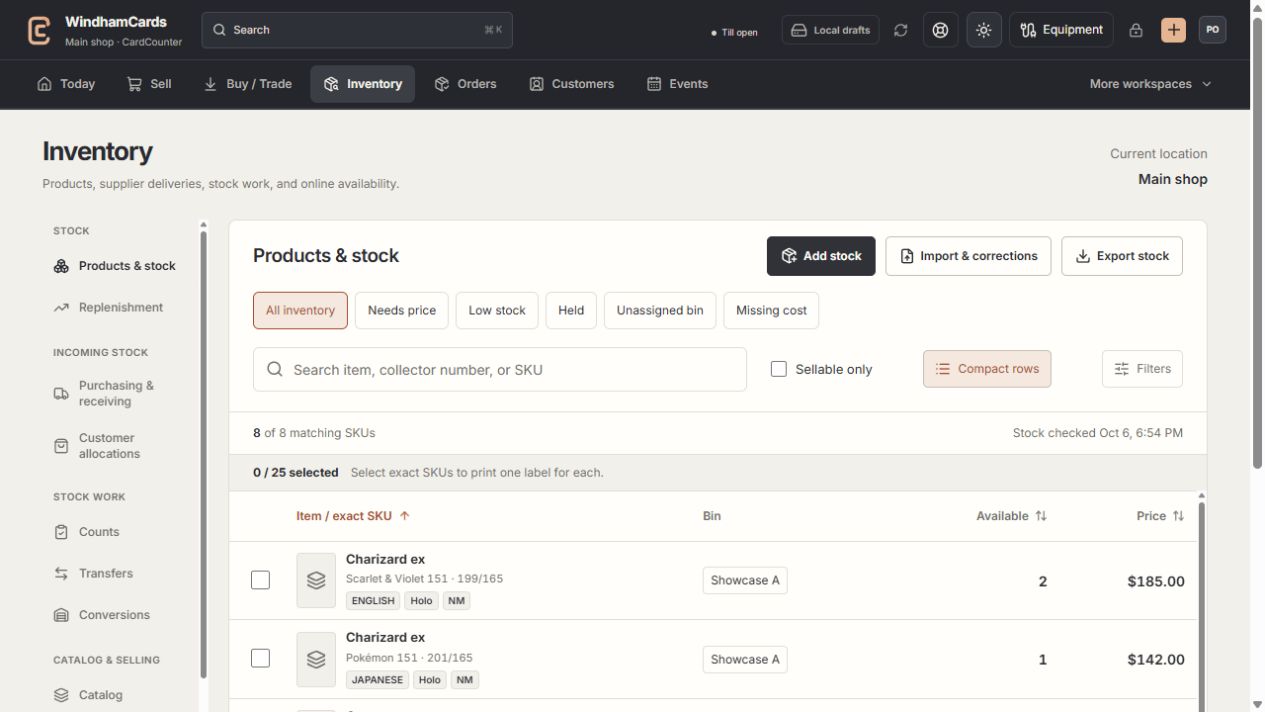
- 1Inventory sections
Move between stock work, pricing, channels, labels and scanning.
- 2Saved views and search
Find missing prices, low stock, holds or an exact shop SKU.
- 3Available stock
Read quantities and physical bins for the exact variant.
Keep in mind
A conversion records what physically happened. It does not identify random pack contents automatically or create market prices for them.
Conversion history can be filtered by source item, reason and known or unknown cost.
If something goes wrong
The conversion cannot be posted
Review availability, output identity, bins and cost validation. Avoid separate quantity edits that hide the physical conversion.