Pick, pack and fulfill an order
Verify paid order items, prepare the parcel and confirm the supported channel fulfillment.
On this page
Before you begin
Select an eligible order in Orders → Online orders.
Owners and managers with order access. Company feature access and current setup requirements apply.
Step by step
- 1
Verify the fulfillment basis
Check payment, delivery method, remaining unfulfilled quantity and exact SKU mapping. Resolve exceptions first.
- 2
Pick physical items
Use the location and bins to find the correct printings and quantities. Inspect condition before packing.
- 3
Prepare the parcel
Use protective packaging and record the actual package measurements. If buying postage in CardCounter, follow the seller’s verified shipping setup and rate review.
- 4
Confirm the channel action
Use the supported fulfillment control with the reviewed quantities and tracking information. Wait for its confirmed result.
- 5
Read the final status
Check remaining items, order history and channel requests. Label purchase, packing and confirmed channel fulfillment are separate milestones.
On the screen
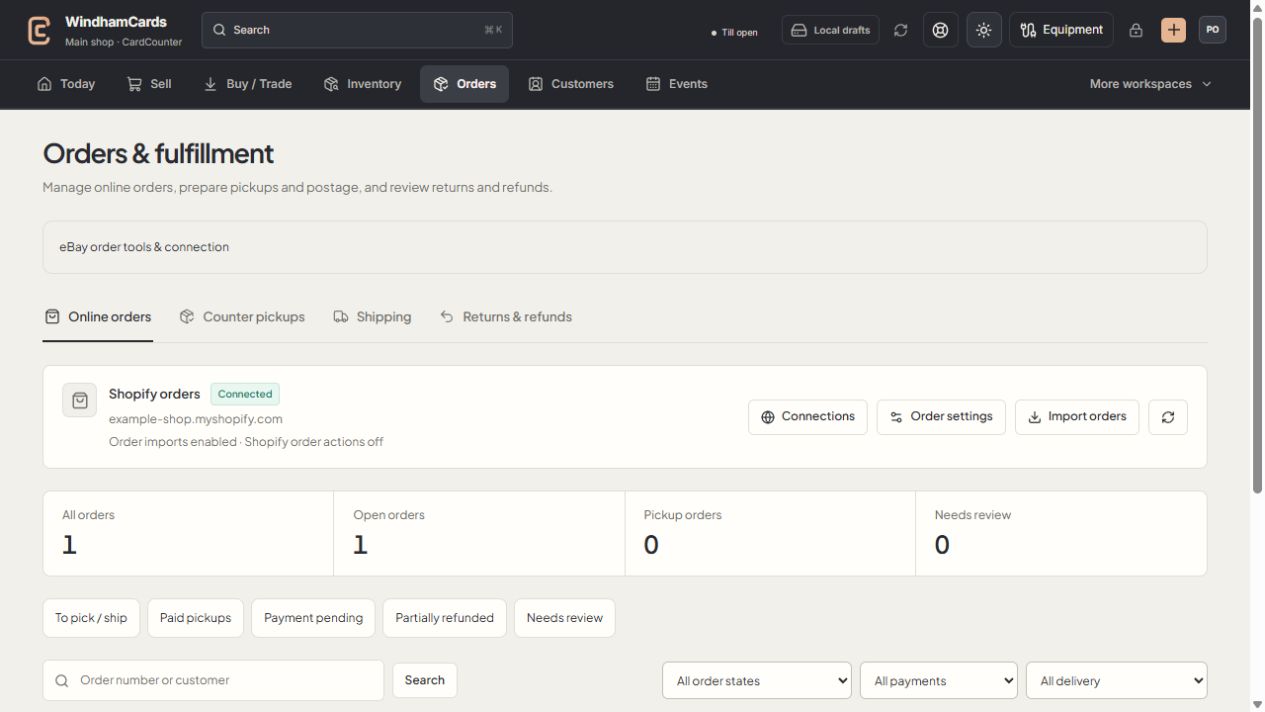
- 1Order workspaces
Online orders, pickups, shipping and returns have distinct records.
- 2Task queues
Separate paid work from pending payments and exceptions.
- 3Filter the records
Use order, payment and delivery filters, then open the intended order.
Keep in mind
A printed label does not prove a package was handed to the carrier or the order was fulfilled in the channel.
Do not fulfill unpaid or unresolved orders solely because the goods are already packed.
If something goes wrong
Fulfillment needs review
Inspect the existing channel command and provider state before submitting another fulfillment.