Review customer wants and deck lists
Match exact printings and prepare selected available lines as a counter draft.
On this page
Before you begin
Open Customers → Wants & deck lists.
Staff with customer access. Company feature access and current setup requirements apply.
Step by step
- 1
Open the list revision
Check customer, list name, kind, revision and whether it is archived. Read unresolved items before promising availability.
- 2
Match exact lines
Confirm the printing and supported SKU with the customer. Name-only matches can include different languages, finishes or conditions.
- 3
Select the intended items
Review quantities and available stock, then choose Prepare selected lines in Counter.
- 4
Continue in Sell
Open the resulting draft, obtain current prices and reserve eligible stock before taking payment. Keep the list and its revision for context.
On the screen
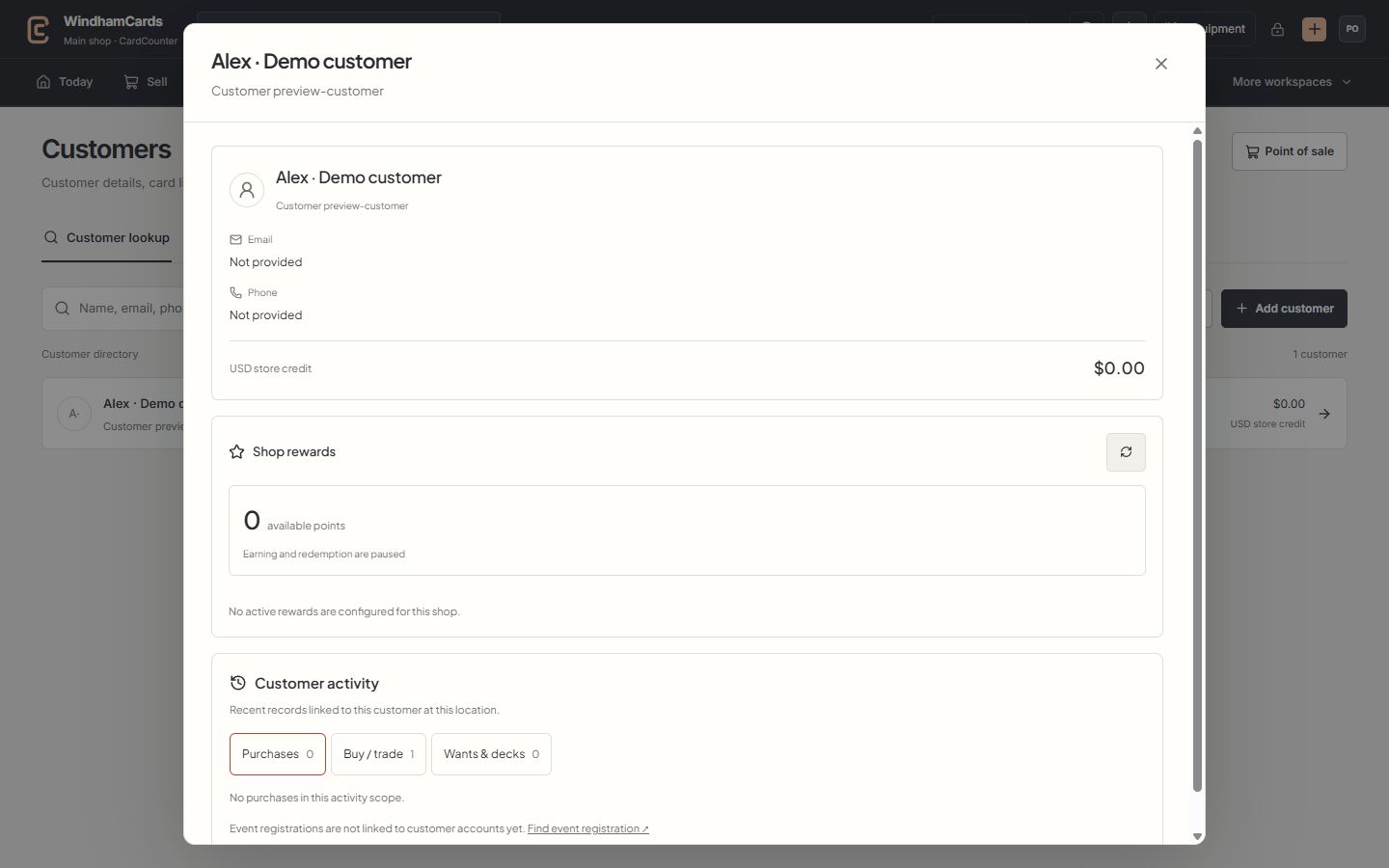
- 1Verified customer
Check the selected name and customer number before attaching a sale.
- 2Store credit
Read the recorded wallet balance and currency; rewards points are separate.
- 3Customer activity
Switch between purchases, buying records, wants and decks at this location.
Keep in mind
Draft creation preserves the list and does not reserve stock. One draft is allowed for a reviewed list revision.
The account availability summary is not an outbound notification service. The list screen states when no messages are sent.
If something goes wrong
A draft already exists
Open the linked counter draft instead of creating another from the same revision. Review its current state and quote.