Return a counter purchase
Inspect an item from its original sale, record disposition and confirm the appropriate refund.
On this page
Before you begin
Use Sell → Return or Orders → Returns & refunds with the original receipt available.
Staff with counter access. Company feature access and current setup requirements apply.
Step by step
- 1
Select the original line
Check purchased quantity, previous returns and remaining eligibility. Confirm the customer’s item matches the sold printing and condition.
- 2
Inspect the physical return
Record inspection and the required reason. Returned stock enters the review or quarantine flow before it can become sellable.
- 3
Choose a disposition
Restock to the correct condition SKU and bin only after inspection, or record the supported write-off decision. A refund alone is not a stock decision.
- 4
Review the refund
Use the original tender’s supported process. Confirm cash only when handed over; wait for a card-provider refund result when applicable.
- 5
Verify both records
Check the return, stock disposition and refund status. A pending card refund is different from a completed cash handover.
On the screen
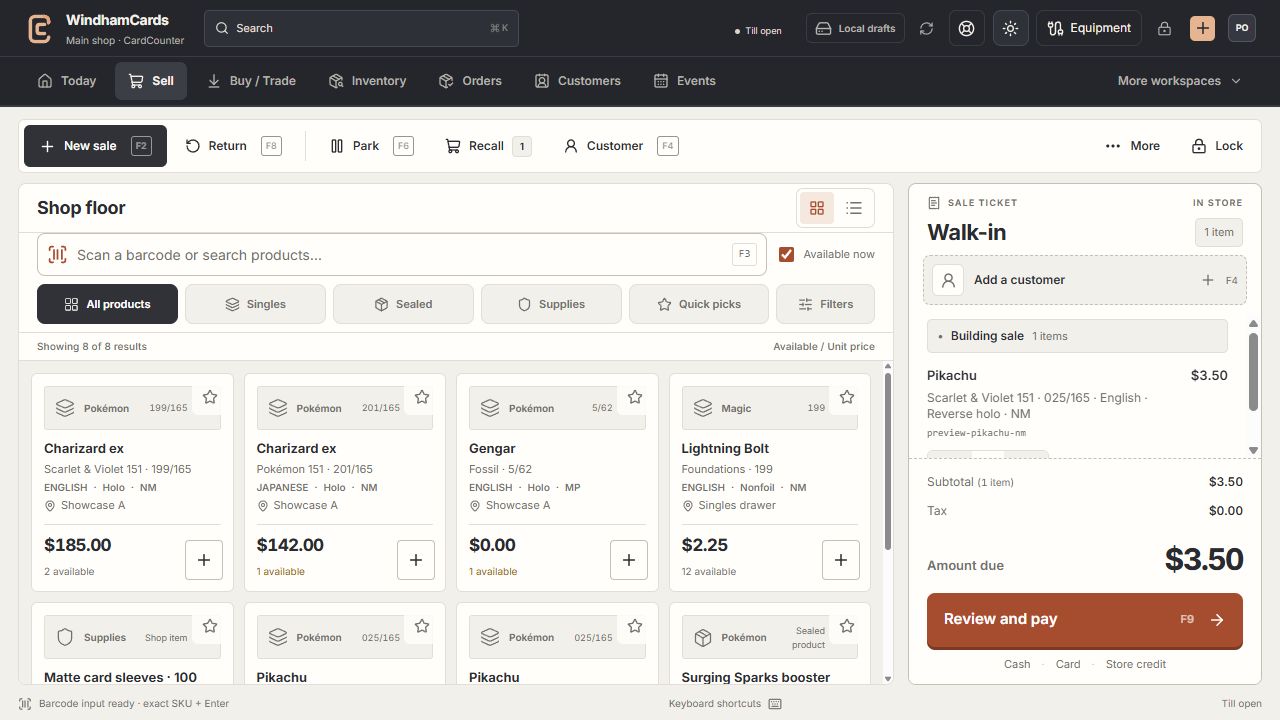
- 1Register actions
Start, park or recall a sale and open the customer panel.
- 2Exact product search
Search or scan, then confirm the printing, finish and condition.
- 3Sale ticket
Review the customer, quantities and current amount before payment.
Keep in mind
The shop’s approved return policy governs eligibility. This guide does not determine a customer’s legal rights or a new policy.
Online channel returns and refunds have a separate flow and provider history.
If something goes wrong
Restock is blocked
Check the quarantine state, exact condition SKU, bin and remaining return quantity. Do not add opening stock to hide an unresolved return.