Take a cash payment
Record the amount physically received and check the change due before confirming.
On this page
Before you begin
Use an approved counter with an open drawer and a current sale quote.
Staff with counter access. Company feature access and current setup requirements apply.
Step by step
- 1
Open payment review
Choose Review and pay and inspect the exact lines and amount due. Resolve any expired hold or quote warning first.
- 2
Select Cash
Read the amount required, enter the cash handed over and verify the calculated change. Count both the received notes and returned change.
- 3
Confirm the handover
Only confirm after physical cash is received and change is agreed. The recorded cash tender contributes to this till session.
- 4
Check the receipt
Wait for completion, inspect the tender and receipt number, then print if required. Reprinting never requires another cash confirmation.
On the screen
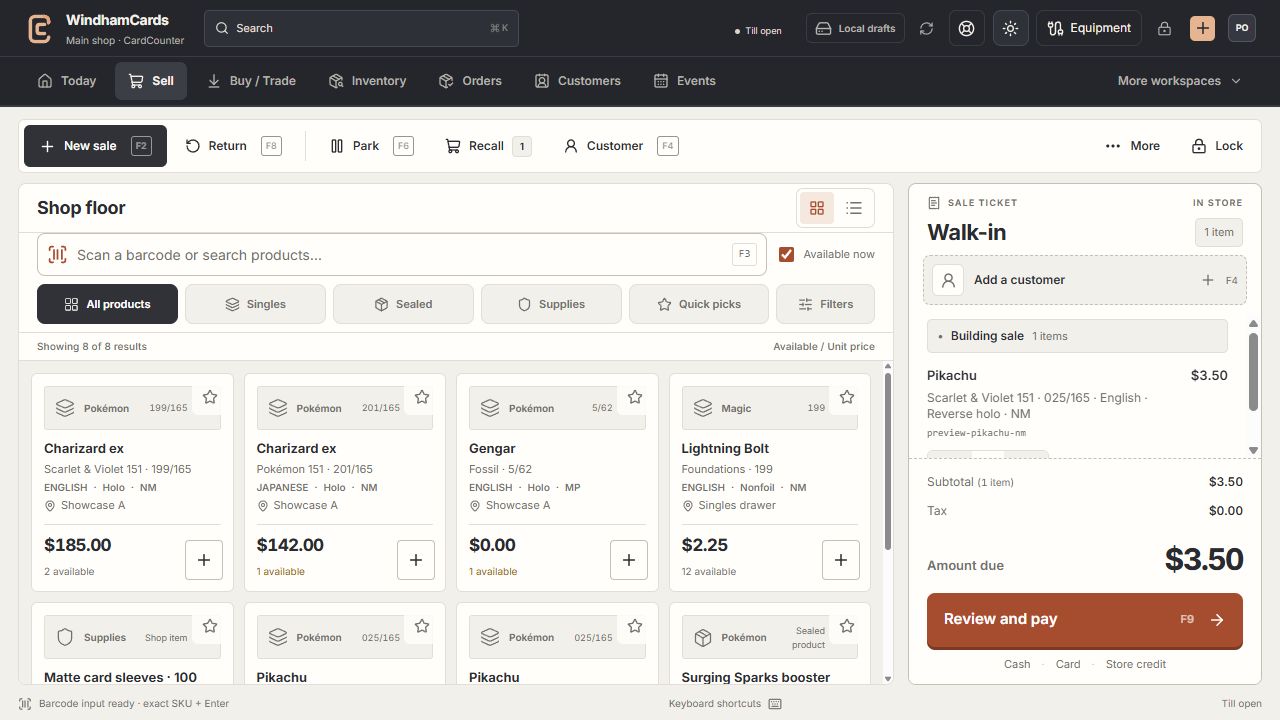
- 1Register actions
Start, park or recall a sale and open the customer panel.
- 2Exact product search
Search or scan, then confirm the printing, finish and condition.
- 3Sale ticket
Review the customer, quantities and current amount before payment.
Keep in mind
Documentation screenshots use synthetic money. The live register must use the actual drawer and shop policies.
If the response is lost, inspect receipts and tender records before trying again. A connection error does not prove cash was not recorded.
If something goes wrong
Cash is unavailable
Check counter approval, the till session, company cash access and the current quote. Reopen readiness review instead of inventing an external tender.