Control online stock availability
Choose eligible exact products and the quantities each connected channel may expose.
On this page
Before you begin
Open Inventory → Online availability.
Owners and managers; stock visibility depends on role. Company feature access and current setup requirements apply.
Step by step
- 1
Review exact channel mapping
Confirm each Shopify or eBay listing represents the correct SKU, variant and location. Resolve ambiguous mappings before publishing.
- 2
Set the supported availability policy
Choose which products can sell online and review the channel’s quantity limits or safety controls shown by the tool.
- 3
Read stock and synchronization state
Compare physical availability, reservations and the confirmed channel state. A prepared update can still be awaiting provider delivery.
- 4
Review listing actions
Use the channel-specific listing tool and verify the provider result. Check errors and sold-stock reconciliation before attempting another update.
On the screen
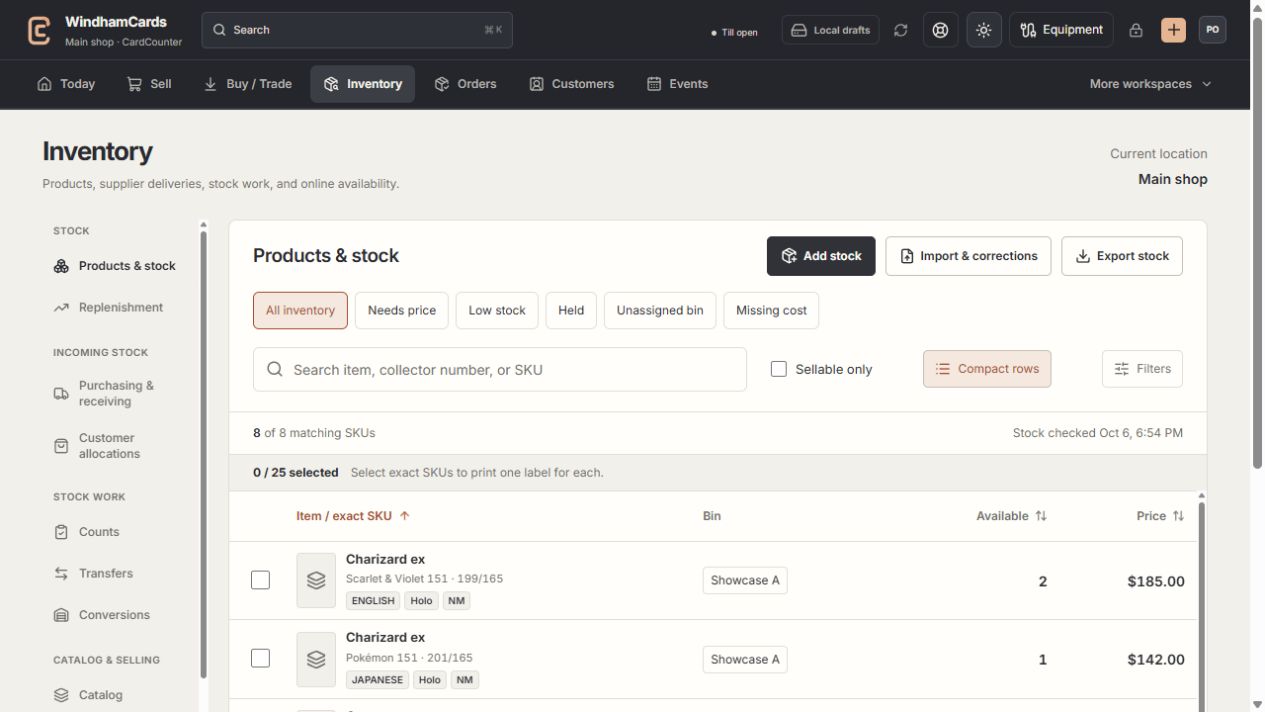
- 1Inventory sections
Move between stock work, pricing, channels, labels and scanning.
- 2Saved views and search
Find missing prices, low stock, holds or an exact shop SKU.
- 3Available stock
Read quantities and physical bins for the exact variant.
Keep in mind
A visible online availability setting does not establish a live provider connection or payment capability.
One exact physical copy cannot be promised independently to multiple buyers. Treat unresolved channel outcomes as needing review.
If something goes wrong
The website quantity differs
Check mapping, current reservations, the last confirmed sync and provider errors. Do not overwrite a pending request with a guessed stock number.