Import opening inventory from CSV
Download the current template, preview row outcomes and commit only the opening stock you intend.
On this page
Before you begin
Open Inventory → Products & stock → Import & corrections.
Owners and managers; stock visibility depends on role. Company feature access and current setup requirements apply.
Step by step
- 1
Download the template
Use the template supplied by this workspace. Keep merchant SKUs unique and preserve collector numbers such as 004/102 as text.
- 2
Prepare exact rows
Fill the required identity, quantity, bin and price fields in the template’s format. Prices expressed in cents must use integer cents. Leave cost blank when it is unknown.
- 3
Preview the file
Upload the CSV and read accepted, duplicate, unresolved and warning outcomes. Fix ambiguous identities instead of guessing a different printing.
- 4
Commit the reviewed receipt
Confirm only the intended opening stock. Keep the batch reference and review Import history to verify posted rows.
- 5
Review preserved values
Warnings can show an existing catalog price or default cost was retained. Inspect those rows separately before relying on their shared defaults.
On the screen
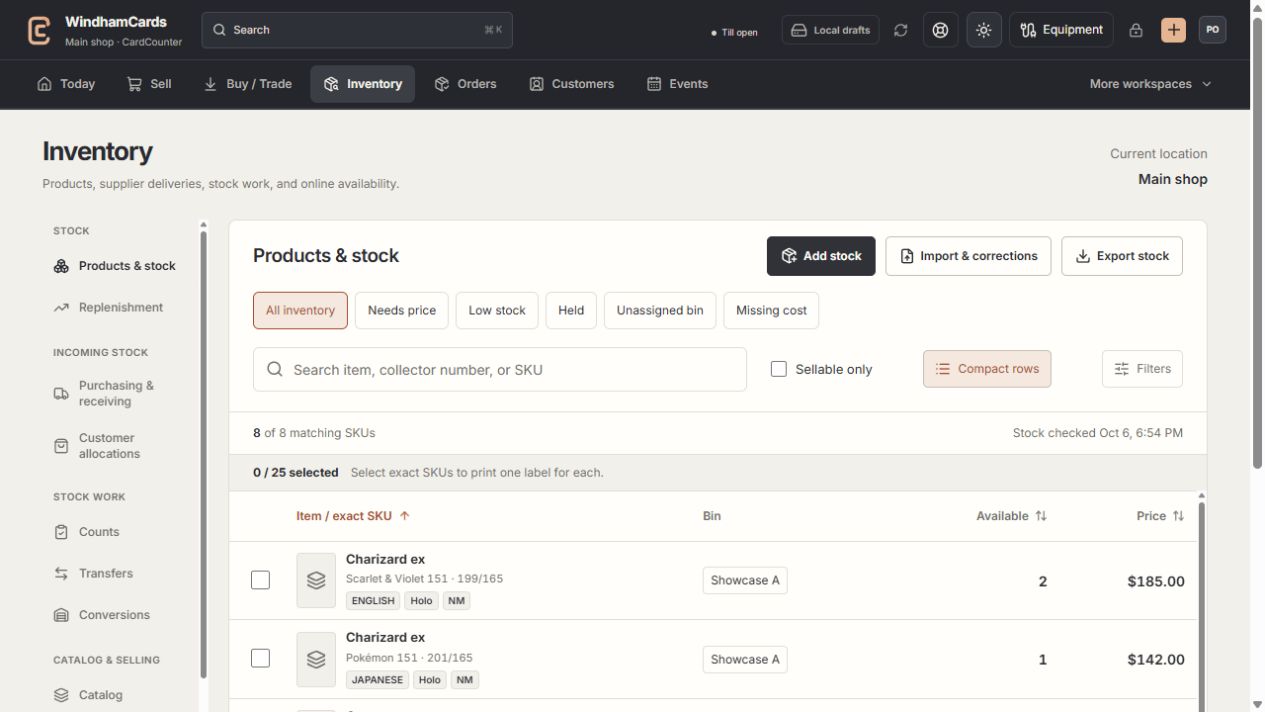
- 1Inventory sections
Move between stock work, pricing, channels, labels and scanning.
- 2Saved views and search
Find missing prices, low stock, holds or an exact shop SKU.
- 3Available stock
Read quantities and physical bins for the exact variant.
Keep in mind
An opening import is for physical starting stock, not an external supplier order or a recurring adjustment.
The preview is not a receipt. Stock changes only after the permitted commit is confirmed.
If something goes wrong
Some rows are unresolved
Read each row’s reason, correct the exact identity or fields and preview again. Duplicates and warnings are not interchangeable with accepted rows.