Review connection health
Check provider environment, verification and action readiness without confusing connection with approval.
On this page
Before you begin
Open More workspaces → Connections.
Owners and managers; account authorizations may require the owner. Company feature access and current setup requirements apply.
Step by step
- 1
Choose the provider
Stripe Terminal handles counter card readiness, Shopify connects online products and orders, and eBay connects marketplace work. Subscription billing is separate.
- 2
Read the status card
Check environment, last verification and the current detail. Sandbox and production mean different provider accounts and outcomes.
- 3
Open setup details
Review account, mapping, reader or policy requirements inside the provider tool. An owner may be required to authorize an account even when managers can inspect it.
- 4
Refresh after a change
Use the provider’s status or refresh action and verify the result before using connected selling or fulfillment actions.
On the screen
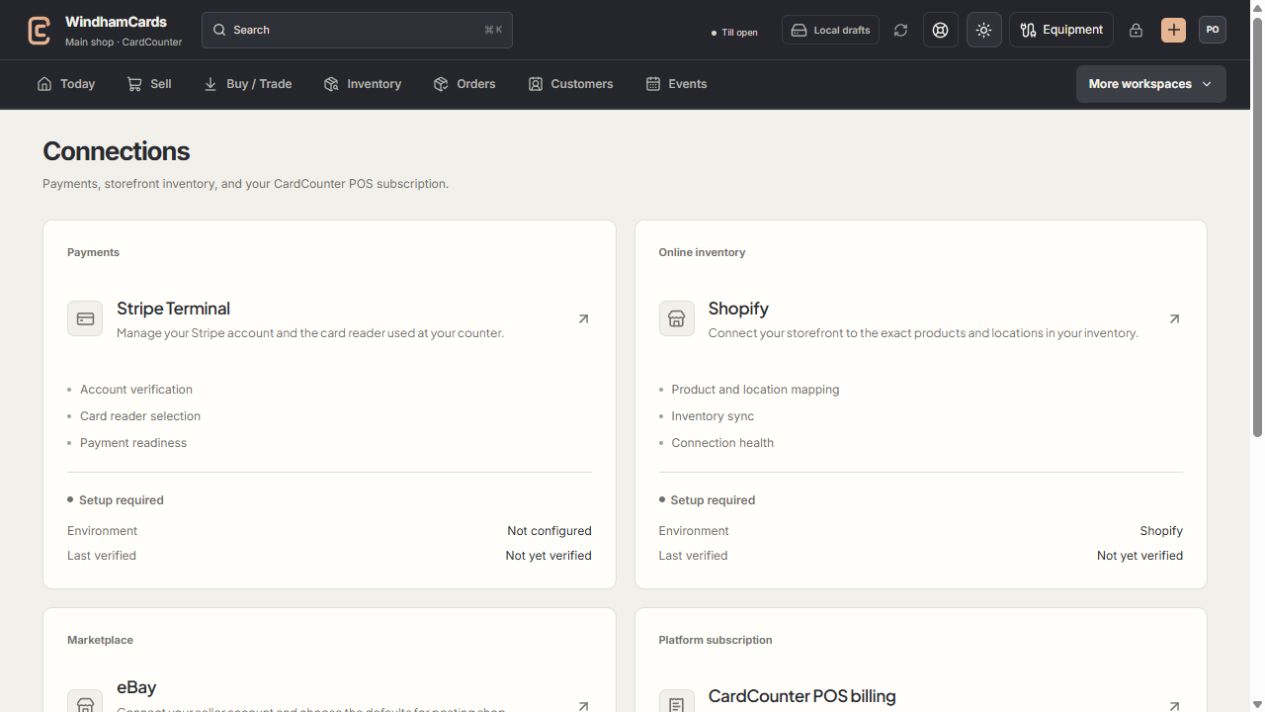
- 1Provider setup
Open the service you intend to configure or review.
- 2Status and verification
Environment and last verification are part of readiness.
- 3Separate billing
Platform billing differs from counter payments and seller postage.
Keep in mind
A connected account does not approve every payment, inventory or shipping operation. Read the specific readiness checklist.
USPS seller authorization lives in Settings → Shipping rather than the marketplace connection cards.
If something goes wrong
The provider is connected but an action is blocked
Check role, company access, environment, required scopes or policies, and the action’s own readiness explanation.