Manage online buying requests
Review customer submissions, track private offer acceptance and link physical intake.
On this page
Before you begin
Open Buy / Trade → Online requests.
Staff with buying access; approvals and payouts depend on role. Company feature access and current setup requirements apply.
Step by step
- 1
Review the submission
Read the declared products, quantities and customer information. Treat submitted identities and conditions as unverified.
- 2
Prepare the reviewed offer
Use the supported quote and offer controls. Check budget and quantity limits and explain any changed inspected terms.
- 3
Use the private status flow
The customer follows the request with its private status code and accepts the current offer where required. Keep that code out of public content.
- 4
Link physical intake
When the property arrives, record the linked collection and inspect the actual items. Follow current acceptance, receipt and settlement before placing items into owned stock.
On the screen
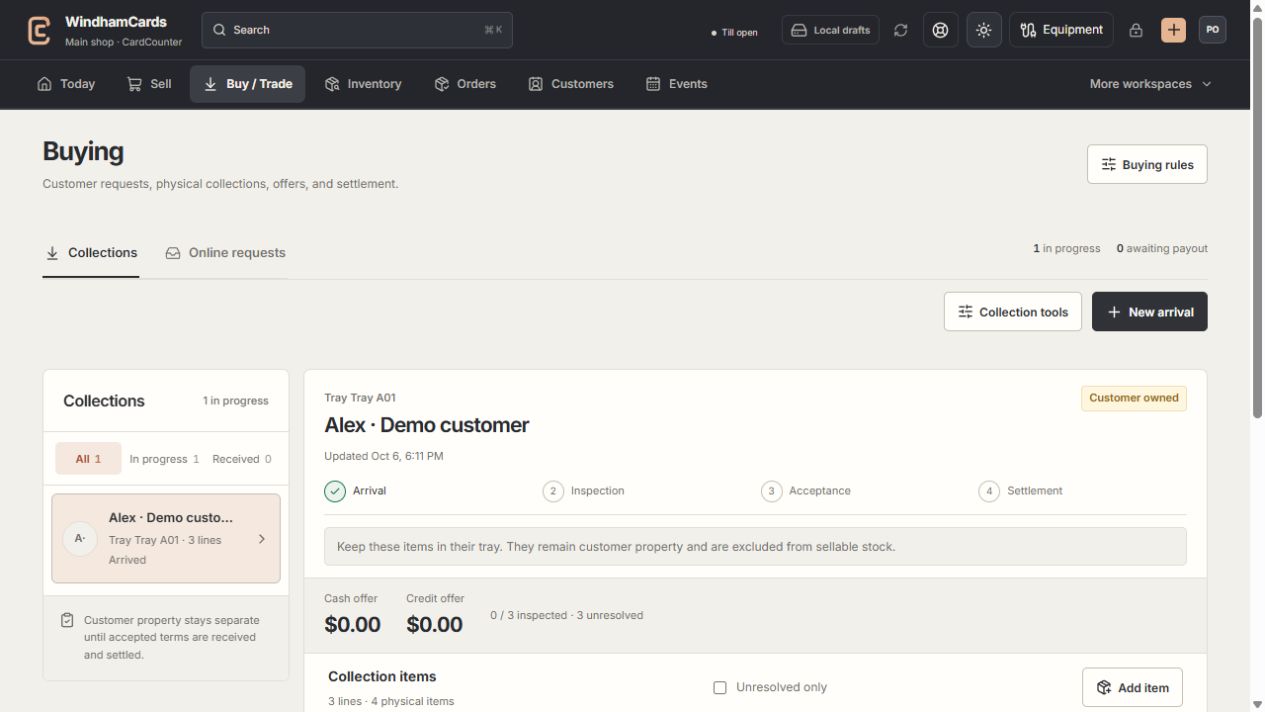
- 1Collection queue
Keep the customer and tray reference attached to the property.
- 2Progress and ownership
Arrival, inspection, acceptance and settlement are separate stages.
- 3Offer summary
Inspect the exact lines and their offers before creating a cash or credit quote.
Keep in mind
Submitting a website request does not reserve a budget indefinitely, transfer ownership or create a payout.
An inspected revision may need new customer acceptance. Review the current offer state instead of relying on the original estimate.
If something goes wrong
A request cannot move to acquisition
Check unresolved inspection lines, quote revision, customer acceptance and budget or quantity blockers.