Quote and record an accepted offer
Present reviewed cash or credit terms and retain the customer’s acceptance of the current quote.
On this page
Before you begin
Open an inspected collection or the linked online buylist offer.
Staff with buying access; approvals and payouts depend on role. Company feature access and current setup requirements apply.
Step by step
- 1
Review all inspected lines
Check exact quantities, conditions and the intended offers. Resolve required missing identities before quoting.
- 2
Choose the offer mode
Prepare Quote cash or Quote credit and inspect the total and current quote revision. Explain the agreed mode and terms to the customer.
- 3
Record acceptance
Use the supported in-person acceptance for a physical collection. A linked online buylist may require the customer to accept the revised inspected offer with their private status code.
- 4
Receive and settle through the recorded flow
After current terms are accepted, follow the permitted acquisition and payout actions. Check whether cash settlement is paid or remains a payable.
On the screen
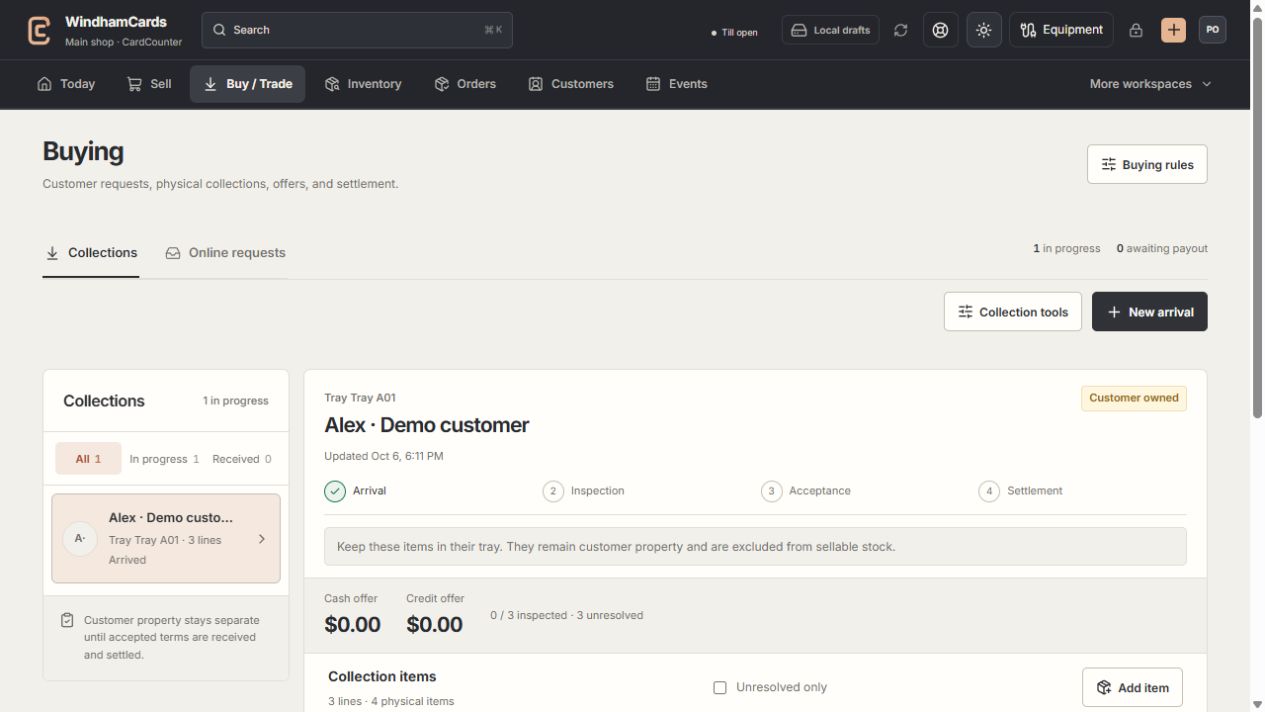
- 1Collection queue
Keep the customer and tray reference attached to the property.
- 2Progress and ownership
Arrival, inspection, acceptance and settlement are separate stages.
- 3Offer summary
Inspect the exact lines and their offers before creating a cash or credit quote.
Keep in mind
A rule preview is not a customer quote. An older accepted revision cannot authorize changed inspected terms.
Changes in quantity, condition or offers can require a new quote and acceptance. Keep the customer involved in that review.
If something goes wrong
Current customer acceptance is required
Open the linked offer, publish the revised inspected quote when permitted and have the customer accept the current version through their private page.