Review online orders
Find imported channel orders and check items, payment, delivery and exceptions before fulfillment.
On this page
Before you begin
Open Orders → Online orders.
Owners and managers with order access. Company feature access and current setup requirements apply.
Step by step
- 1
Choose a task queue
Use To pick / ship, Paid pickups, Payment pending, Partially refunded or Needs review. Clear filters to return to a wider view.
- 2
Read the order details
Confirm channel, order number, currency, exact mapped items and customer delivery information. Protected information may remain available only in the provider account.
- 3
Check action requirements
Read the order’s payment and fulfillment states and the stated permission for each action. An imported order is not automatically paid or ready to ship.
- 4
Resolve import exceptions
Open a needs-review order and inspect missing or ambiguous inventory mapping. Keep the provider order reference while resolving it.
- 5
Review existing channel requests
Inspect durable fulfillment, cancellation and refund commands before sending another request after a timeout.
On the screen
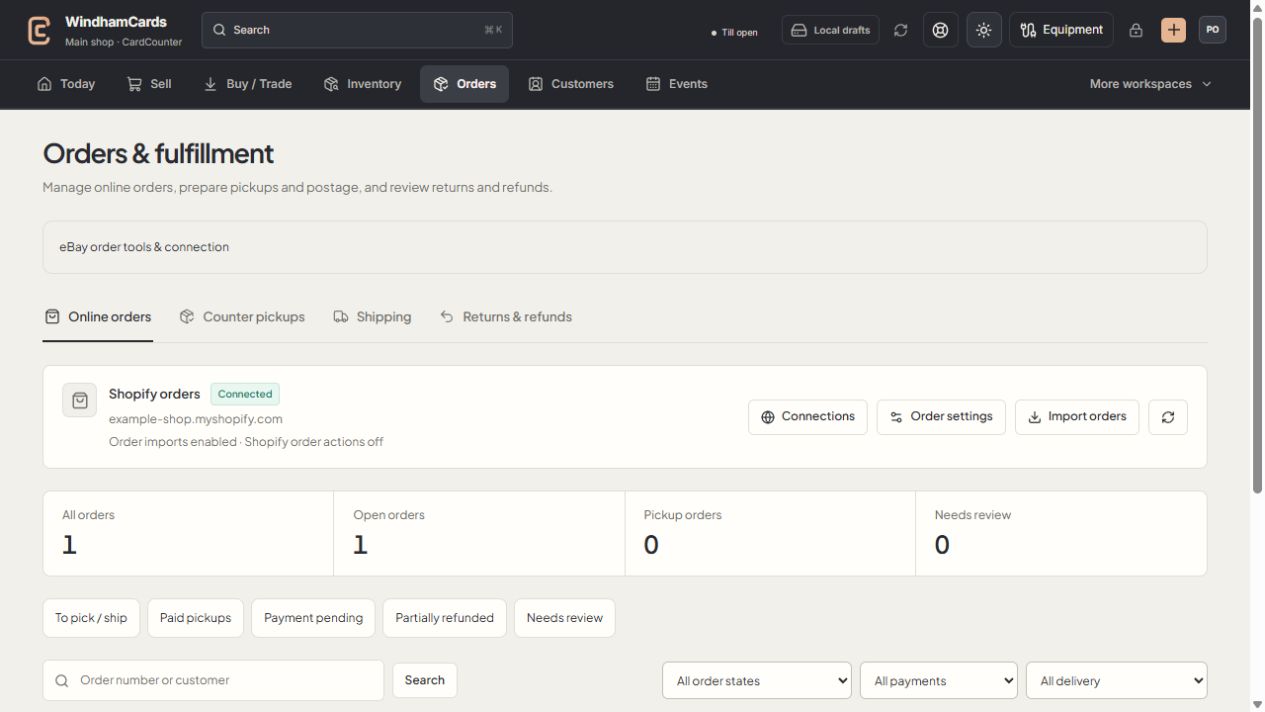
- 1Order workspaces
Online orders, pickups, shipping and returns have distinct records.
- 2Task queues
Separate paid work from pending payments and exceptions.
- 3Filter the records
Use order, payment and delivery filters, then open the intended order.
Keep in mind
Channel and shop activity are linked but remain distinct records. Check the most recent confirmed provider outcome.
An empty queue can mean a filter has no matches rather than that the shop has no orders.
If something goes wrong
An action is blocked
Read Action requirements for that order and inspect payment, mapping, stock and connection readiness.