Review online refunds and cancellations
Use channel-backed order actions and reconcile their payment outcome separately from stock disposition.
On this page
Before you begin
Open the original online order or Orders → Returns & refunds.
Owners and managers with order access. Company feature access and current setup requirements apply.
Step by step
- 1
Read the original record
Confirm provider order number, currency, applied payment and previous refunds. Check remaining eligible quantities.
- 2
Review the supported action
Choose the intended cancellation, return or refund action and read its requirements. Unpaid cancellation differs from refunding a paid order.
- 3
Confirm once
Review the amount and affected lines before sending the permitted channel request. Keep its durable reference.
- 4
Reconcile the outcome
Inspect pending, confirmed and failed provider commands. An uncertain result needs checking before a new refund is sent.
- 5
Handle returned stock separately
Inspect the physical item and follow the correct quarantine or restock procedure. Refunding an order alone does not receive sellable stock.
On the screen
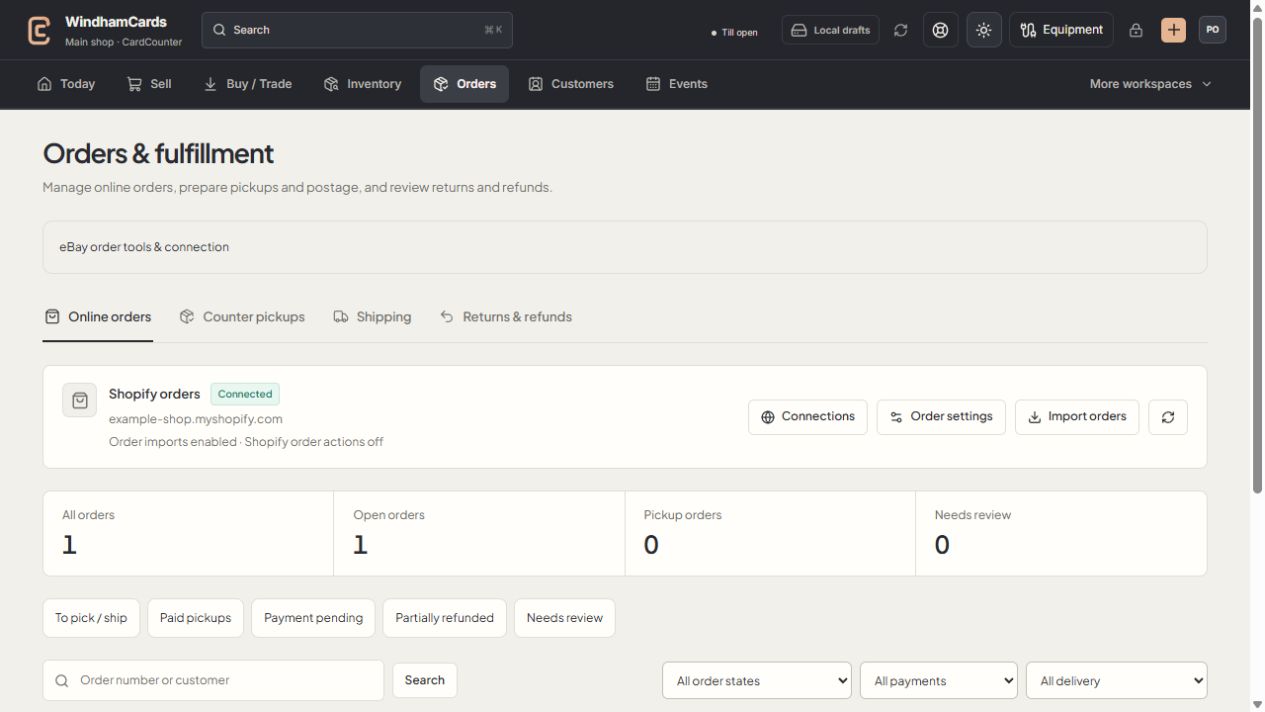
- 1Order workspaces
Online orders, pickups, shipping and returns have distinct records.
- 2Task queues
Separate paid work from pending payments and exceptions.
- 3Filter the records
Use order, payment and delivery filters, then open the intended order.
Keep in mind
Provider refunds return through the supported original payment flow; they are not a manual cash payout from the till.
Reports distinguish confirmed refunds from unresolved outcomes and describe their coverage gaps.
If something goes wrong
A refund remains pending
Check order history and the existing provider command. Contact support with a non-sensitive reference rather than requesting another refund.