Change or cancel an event
Review booking impact, guest updates and refund obligations before changing a published session.
On this page
Before you begin
Select the session and open its Settings view with management access.
Staff with event access; session changes require management. Company feature access and current setup requirements apply.
Step by step
- 1
Review existing commitments
Check confirmed guests, held seats, ticket prices and payment state before editing time, capacity or recurring dates.
- 2
Use the supported change review
Session details and Weekly schedule explain permitted changes. Review the impact before confirming a future-session edit.
- 3
Read guest updates
Changes can be available on private booking pages. Use the stated delivery status rather than assuming a notification was emailed or texted.
- 4
Review cancellation
Use Review cancellation, inspect affected guests and required refunds, then confirm only the intended session.
- 5
Resolve refund work
Cancellation revokes admission. Check each original-tender refund result and outstanding exception separately.
On the screen
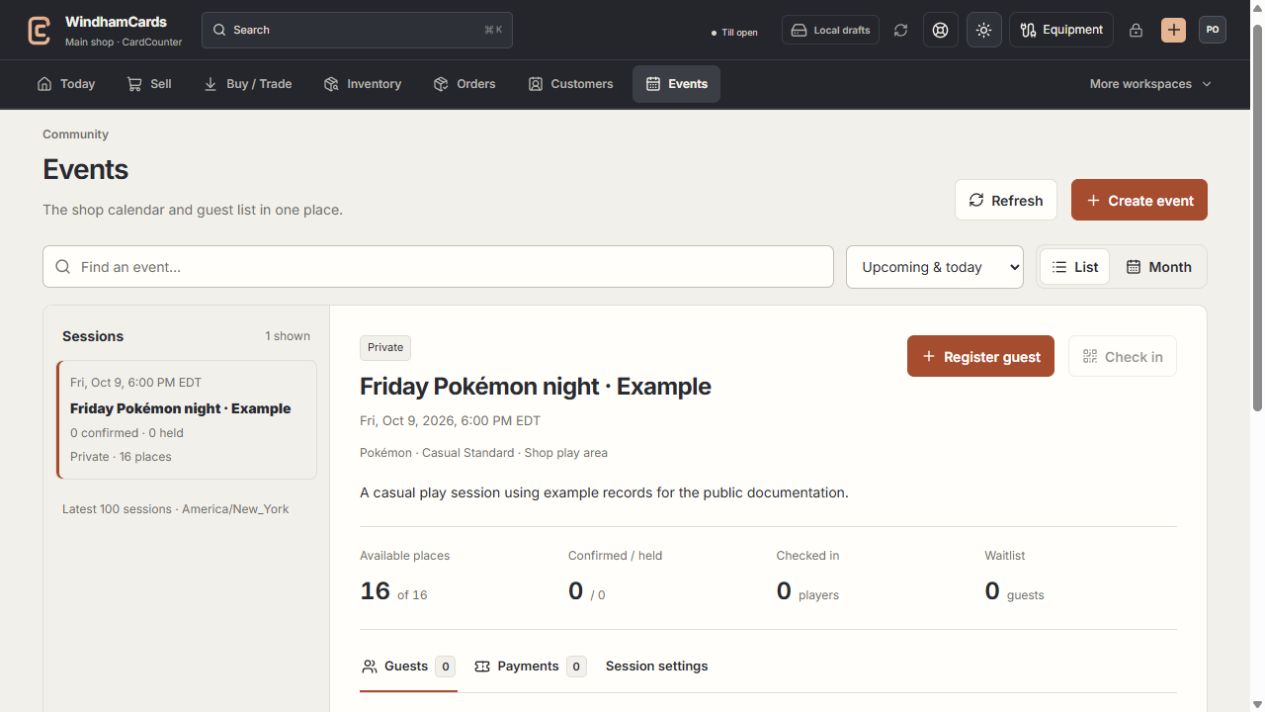
- 1Calendar or list
Find the intended session and verify the shop time zone.
- 2Session and guests
Capacity, held seats and confirmed registrations are separate.
- 3Manage sessions
Review scheduling, ticket and publication changes with management access.
Keep in mind
Existing booked prices remain recorded even when a ticket type is edited for future bookings.
A session cancellation does not establish that every payment has been refunded. Check the payment and refund records.
If something goes wrong
A cancellation has unresolved refunds
Use the event’s refund review and existing provider references. Do not recreate cancelled bookings to conceal outstanding work.