Offer free shipping to buyers
Save a free-shipping preference and verify the actual Shopify checkout while the seller funds postage.
On this page
Before you begin
Open Settings → Shipping and review Buyer delivery policy.
Owners and managers with order access. Company feature access and current setup requirements apply.
Step by step
- 1
Choose the buyer preference
Select the supported free-shipping preference or let Shopify manage buyer rates. Read the saved policy explanation.
- 2
Configure the real checkout
Set the intended eligible free-shipping rate in the merchant’s Shopify checkout configuration. Saving a CardCounter preference does not change Shopify rates.
- 3
Read verification status
Shopify setup pending and Checkout verification unavailable mean the $0 offer has not been confirmed. Do not advertise the preference as active until checkout is actually verified.
- 4
Test an eligible buyer order
Check the real checkout with the intended destination and eligibility rules. The verified delivery policy describes its provider and verification time.
- 5
Fund the parcel as seller
Buy the eligible label from your shop’s USPS account. A $0 buyer charge does not remove the seller’s postage cost.
On the screen
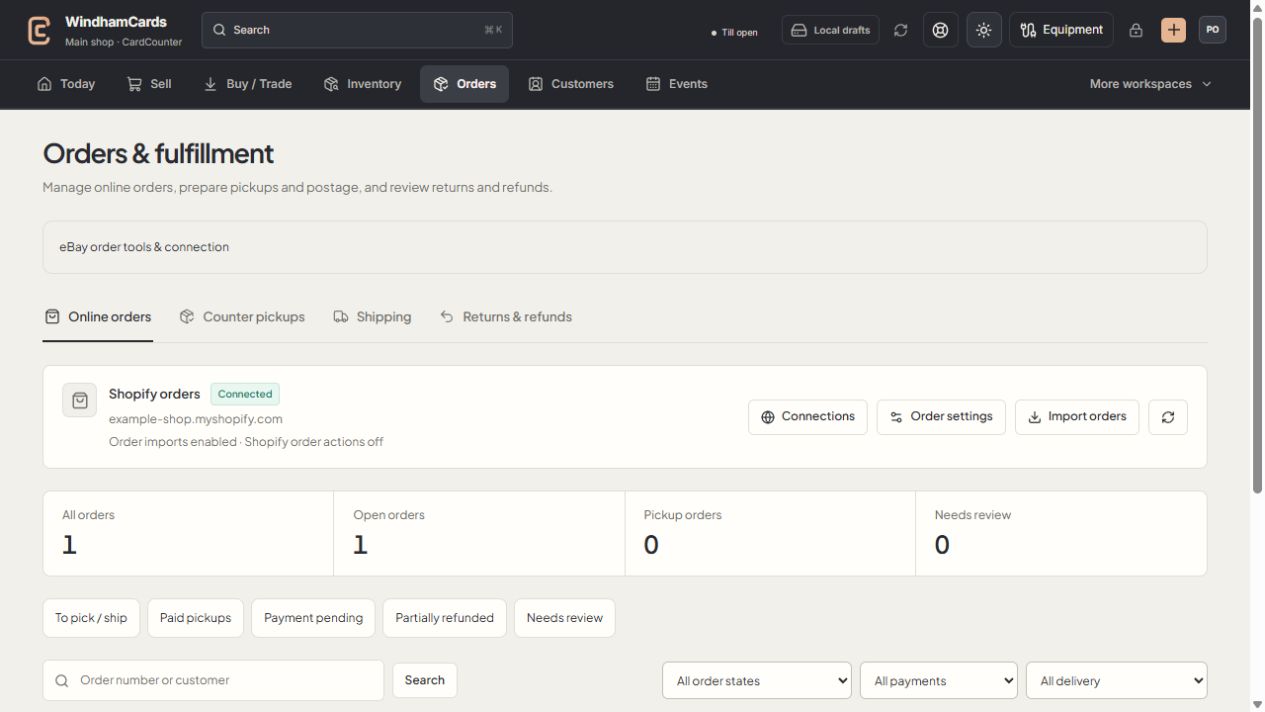
- 1Order workspaces
Online orders, pickups, shipping and returns have distinct records.
- 2Task queues
Separate paid work from pending payments and exceptions.
- 3Filter the records
Use order, payment and delivery filters, then open the intended order.
Keep in mind
Buyer delivery pricing and seller postage are separate. Charging the buyer for shipping does not automatically transfer those funds to USPS.
Where the workspace cannot verify Shopify shipping rates yet, the saved preference remains pending and buyers may still see a shipping charge.
If something goes wrong
Buyers still see a charge
Review Shopify rate eligibility and the current verification status. Contact support before claiming that a saved CardCounter preference changed checkout.